What is it
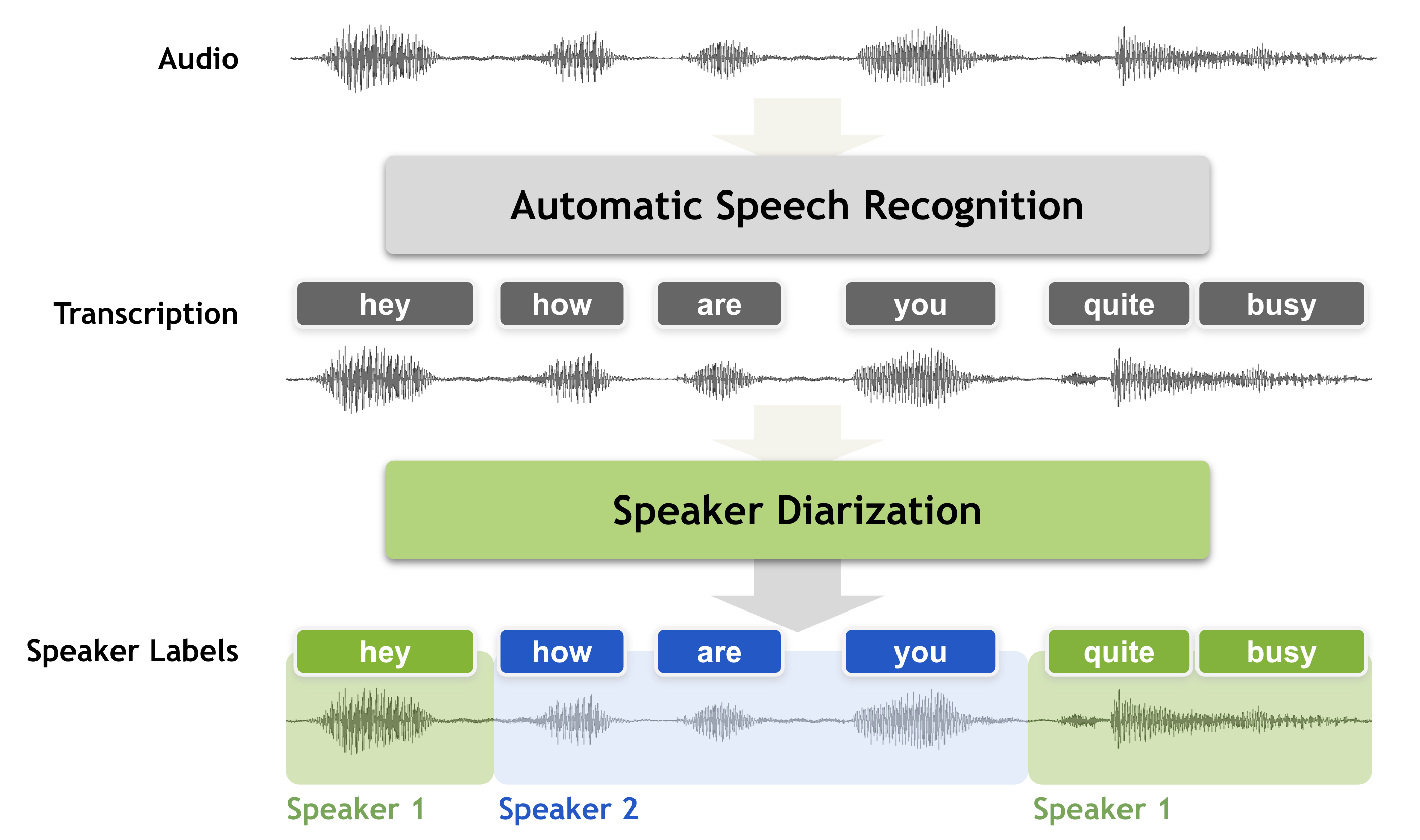
Speaker diarization is a speech processing technique used to determine “who spoke when” in an audio recording. It automatically identifies and labels each speaker, breaking raw, multi-speaker audio into structured segments such as “Speaker A: Hello” and “Speaker B: Hi, how are you?”
The goal is to segment an input signal into homogeneous sections, each belonging to a single speaker, and label those sections accordingly. Without diarization, transcripts of meetings, interviews, or podcasts become long blocks of text with no indication of who said what — making them hard to read, analyze, or use for downstream applications like summarization, sentiment analysis, or automatic note-taking.
Diarization is often integrated with Speech Activity Detection (SAD) and Automatic Speech Recognition (ASR) systems, enabling them to produce clean, speaker-attributed transcripts for research, analytics, and accessibility tools.
Real-Life Applications
Speaker diarization quietly powers many of the tools we use every day:
- Meeting platforms (Zoom, Google Meet, Microsoft Teams) use it to generate labeled transcripts and speaker summaries.
- Customer service analytics platforms separate agent and customer voices to assess emotion, compliance, and performance.
- Media and broadcast archives rely on it to segment interviews, debates, and documentaries for indexing and search.
- Healthcare and legal transcription systems use diarization to attribute statements to the correct participant, ensuring data integrity.
It is also applied in multimodal human-computer interaction, where knowing “who spoke when” helps systems respond naturally to different users — a key step toward context-aware AI assistants.
Why it’s important in data science
In data science, speaker diarization bridges unstructured audio and structured analytical data. By labeling segments with speaker identities, it enhances data accuracy, readability, and analytical value. This allows models to perform advanced analyses such as:
- Sentiment and emotion analysis by speaker
- Conversation dynamics tracking (e.g., talk time ratios, interruptions)
- Topic modeling and clustering of speech segments
These structured transcripts improve machine learning workflows — particularly speaker-adaptive systems that personalize predictions based on vocal features. Across industries like law, finance, and healthcare, diarization supports audit trails, compliance analysis, and knowledge retrieval, converting raw audio into searchable, actionable datasets.
What library/tool is there?
Speaker diarization pipelines typically follow this structure:
VAD → Segmentation → Speaker Embeddings → Clustering.
The output is twofold:
- Speaker-segmented audio chunks
- Speaker-tagged transcripts for analysis or integration
pyannote.audio – Research and Accuracy
If you want open-source flexibility and strong accuracy, Pyannote Audio is a leading choice. Built on top of PyTorch and integrated with the Hugging Face ecosystem, it provides robust pretrained models for speaker diarization tasks.
Pros:
High accuracy across long and multi-speaker meetings
- Ready-to-use pretrained pipelines on Hugging Face
- Extensible for fine-tuning and research use
Cons:
- Requires a Hugging Face authentication token
- Somewhat heavy (PyTorch dependency)
Example code
[ from pyannote.audio import Pipeline
pipeline = Pipeline.from_pretrained(“pyannote/speaker-diarization”, use_auth_token=”…”)
for seg, _, spk in pipeline(“meeting.wav”).itertracks(yield_label=True):
print(seg.start, seg.end, spk) ]
–> This code uses the Pyannote Audio pretrained model for speaker diarization, which identifies who is speaking and when in an audio file. It processes “meeting.wav” and prints each speaker’s time segments — including the start time, end time, and speaker label for every detected speech turn.
Speaker Diarization — NVIDIA NeMo Framework User Guide latest documentation. (2023). Nvidia.com. https://docs.nvidia.com/nemo-framework/user-guide/latest/nemotoolkit/asr/speaker_diarization/intro.html
Leave a Reply